Barrier-based risk management
Bow tie studies and barrier health, kept live.
Build bow ties with your team, get them reviewed and signed off, then keep the real condition of every barrier in view across all your facilities.
- Diagram and worksheet editing
- E-signed approvals
- Live barrier condition
- Vocabulary of the CCPS / Energy Institute bow tie guidance
- Effective, independent and auditable checks on every barrier
- Barriers linked to safety-critical elements
- Your regulatory references (OISD, P&NG Rules) as report fields
Features
Everything a barrier-based risk study needs
From the first workshop to day-to-day operations, in one place your whole team can reach from a browser.
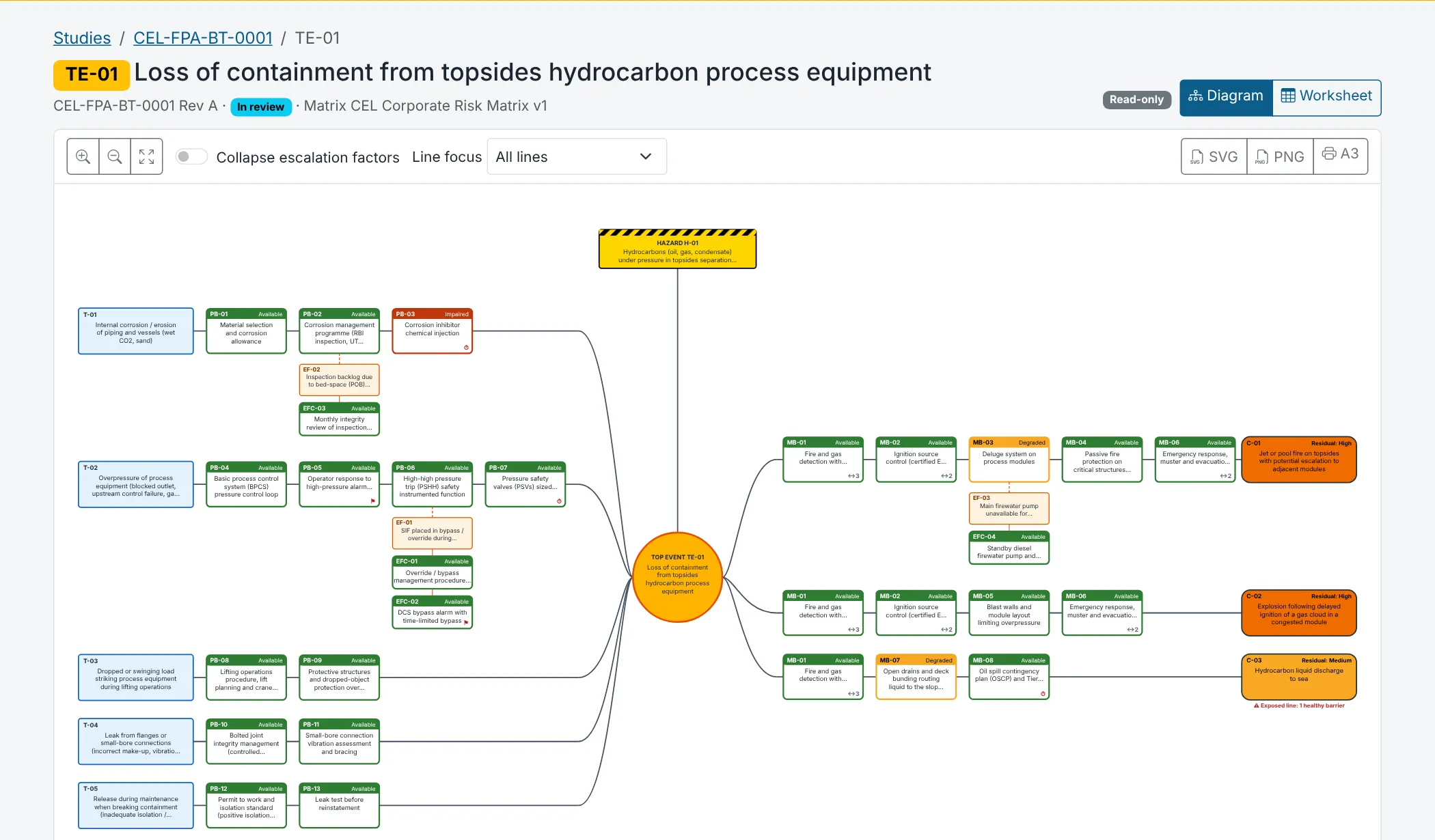
Bow tie diagram
Hazard, top event, threats, consequences, preventive and mitigative barriers, escalation factors and their controls. Shared barriers, zoom, line focus and full keyboard control. Export SVG, PNG or an A3 print.
Worksheet view
The same bow tie as an editable table. Move with Tab and Enter, add and reorder rows. Diagram and worksheet stay in step while colleagues edit.
Barrier health
One register of physical and organisational barriers per facility, shared by every study. Condition changes with compensating measures and restoration dates, plus proof-test records.
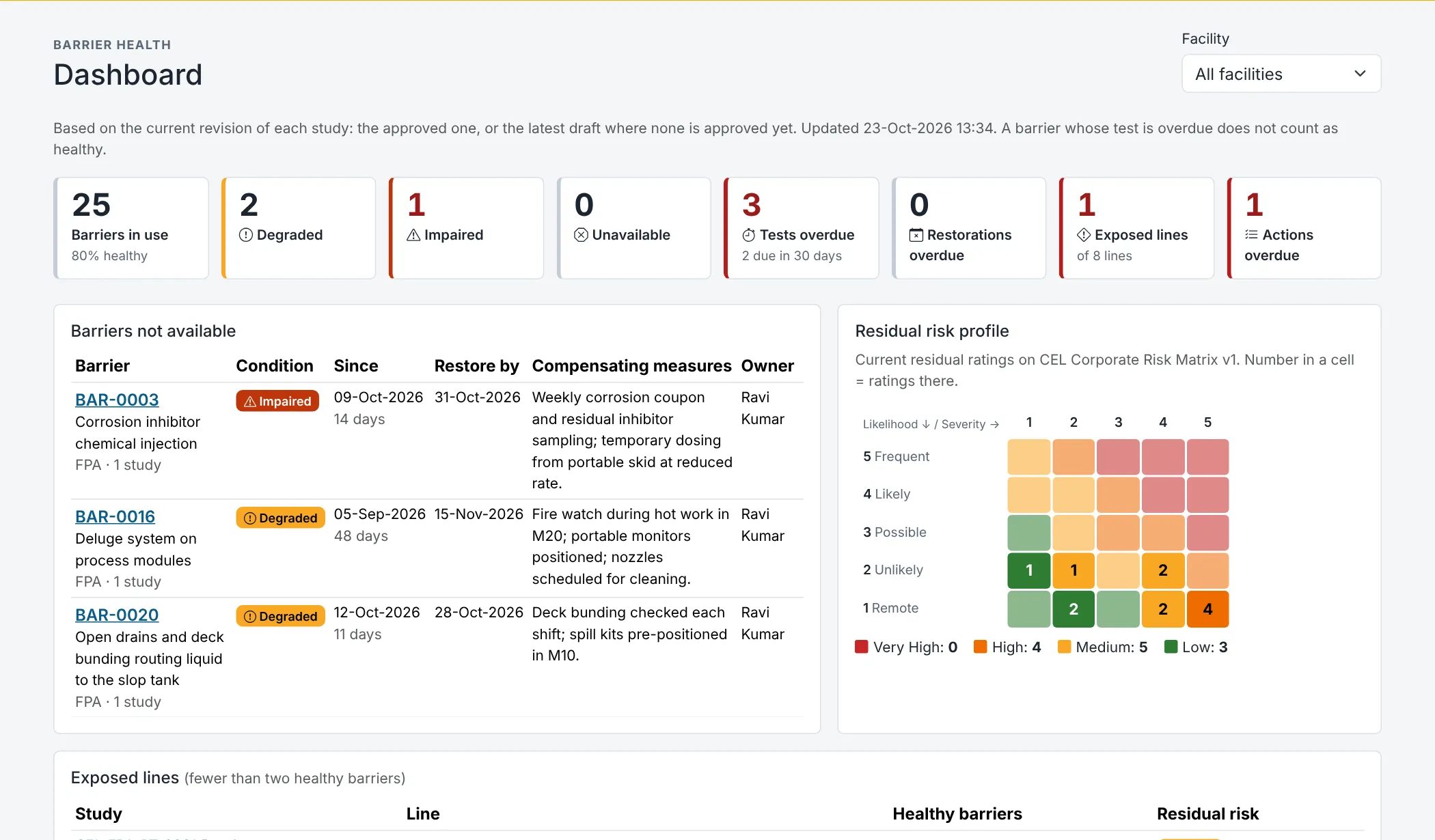
Live dashboard
Barriers in use and healthy, overdue tests and restorations, lines exposed by impaired barriers, and a residual-risk heat map on your own matrix.
Review and approval
Draft, In review, Approved. Comment threads, residual-risk acceptance by the authorised role, and four-eyes approval with an electronic signature and a frozen, hashed snapshot.
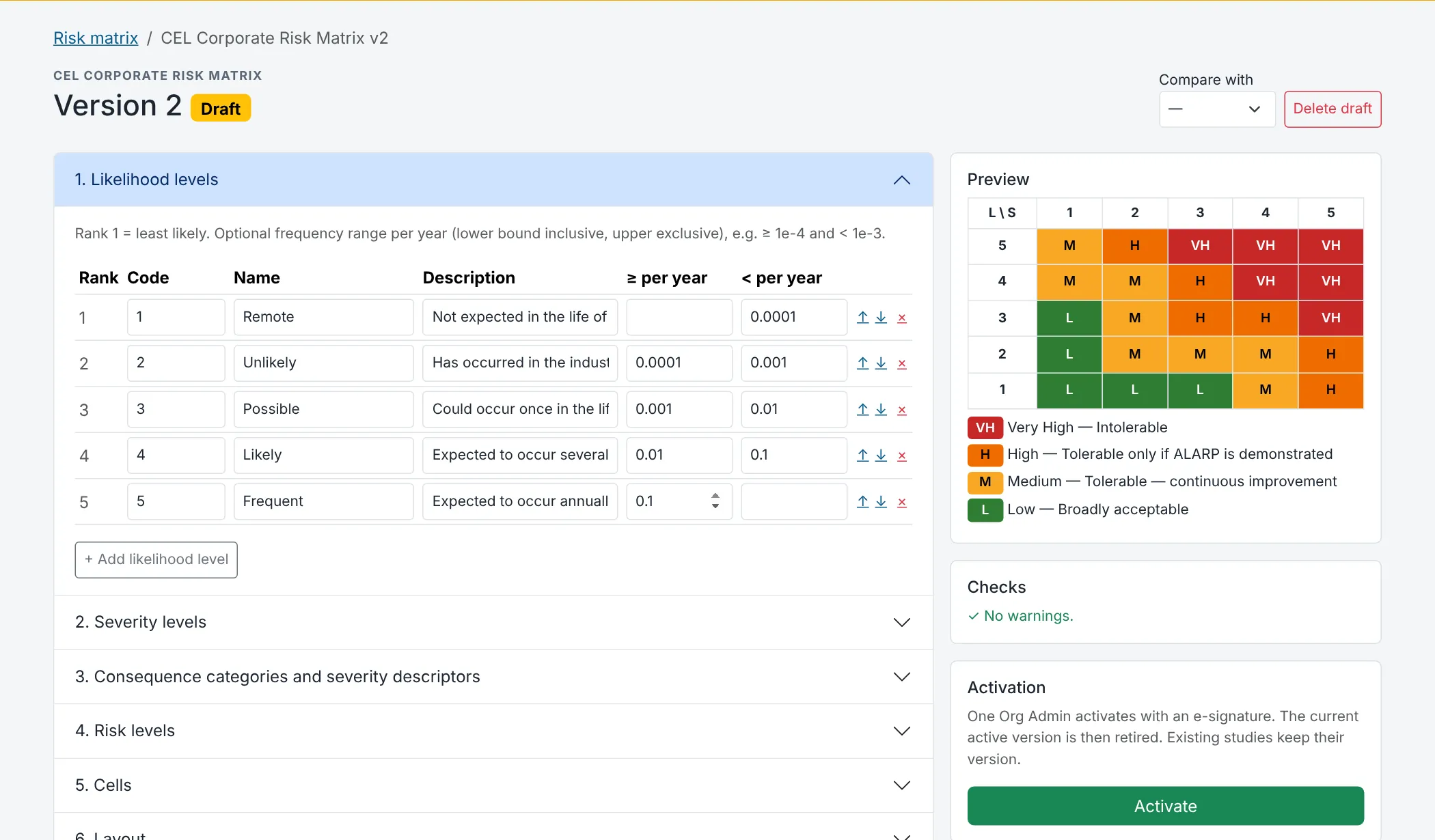
Risk matrix designer
Your matrix, your way: 3 to 7 likelihood and severity levels, consequence categories, tolerability and who may accept each level. Versioned, checked and activated with a signature.
Reports and exports
A complete study report for print or PDF. Barrier register, risk register, actions and studies as print pages, CSV or Excel workbooks.
CSV import
Bring in barrier registers, safety-critical elements and existing bow tie content. Every row is checked first, with a clear error report.
Actions and notifications
Raise actions on any barrier, element or study, with owner, due date and close-out evidence. In-app alerts, e-mail and a daily summary.
A closer look
Studies and operations, joined up
Draw it or type it
Work in the diagram during the workshop, or in the worksheet when you are filling in detail. Both are the same bow tie, and every save is checked against what your colleagues just changed.
- Barrier type, owner, safety-critical element and performance standard
- Effective / independent / auditable with justifications
- Residual risk on the study's own matrix version
See what is protecting you today
A barrier is recorded once per facility and used by every study. When an owner reports it degraded, every bow tie that relies on it and the dashboard show it at once.
- Compensating measures and expected restoration date
- Proof tests with due dates and overdue warnings
- Lines left exposed, with their residual risk
Your risk criteria, under control
Design the matrix your organisation already uses. Checks warn about gaps and inconsistent cells; a new version is activated with a signature, and studies move to it only when you choose.
- Approved studies keep the matrix they were assessed on
- Side-by-side comparison of versions
- Optional four-eyes activation
How it works
From workshop to operations in four steps
-
Set up
The Org Admin adds facilities and people, tunes the picklists and designs the risk matrix.
-
Build
The facilitator leads the workshop and captures bow ties in the diagram or the worksheet, with the team and sessions on record.
-
Review and approve
Reviewers comment, the right role accepts residual risk and an approver signs. The approved revision is frozen.
-
Operate
Barrier owners keep condition and tests up to date. Every bow tie and the dashboard show it; actions track the gaps.
Roles
Everyone sees what their job needs
Give each person one or more roles, for all facilities or just one.
Org Admin
Runs the organisation: users, facilities, settings, matrix, audit log, export. Edits and closes any action.
Facilitator / Study Lead
Leads studies: creates and edits bow ties, submits for review, manages SCEs, imports, changes any barrier condition.
Contributor
Helps build draft studies (edits content), comments, raises actions.
Reviewer
Reviews studies: comments, resolves comments, returns to draft, accepts risks within their authority.
Approver
Approves studies with an e-signature (never their own), accepts risks within their authority.
Barrier Owner
Owns barriers: updates the condition and records tests of barriers they own; works their own actions.
Viewer
Read-only access to studies, barriers, dashboard and reports.
Several sites?
Facilities, areas and systems keep studies and barriers in order. People can belong to more than one organisation and switch between them.
Security and integrity
Records you can stand behind
Built for studies that regulators, auditors and your own management will rely on.
Your organisation, kept separate
Every query is scoped to your organisation on the server. Another organisation's records simply do not exist for your users.
Two-factor sign-in
Authenticator-app codes with single-use recovery codes. Make them compulsory for your whole organisation in one setting.
Electronic signatures
Approvals, risk acceptance and matrix activation are signed with password and code, with the meaning and reason recorded.
Tamper-evident audit trail
Every change is recorded with old and new values in a hash chain. Check its integrity whenever you like.
Your data, exportable
Export the whole organisation as a ZIP of JSON and CSV at any time. You choose the retention period.
No trackers, no third-party scripts
Every file is served from this site under a strict content security policy. Privacy handled under India's DPDP Act, 2023.